

A promo code is the fastest way to unlock extra benefits at Coins.Game – free spins, a deposit boost or special offers tied to seasonal events. Activation takes less than a minute and happens directly in the registration form, with no additional conditions on the player's side. Below we describe the whole process – from entering the platform's site to the bonus being credited to the account – along with fixes for the most common problems. The list of currently working codes, including MAXBONUS granting 150 free spins on the Fruit Million slot, can be found on the site's homepage.
How to activate a promo code MAXBONUS
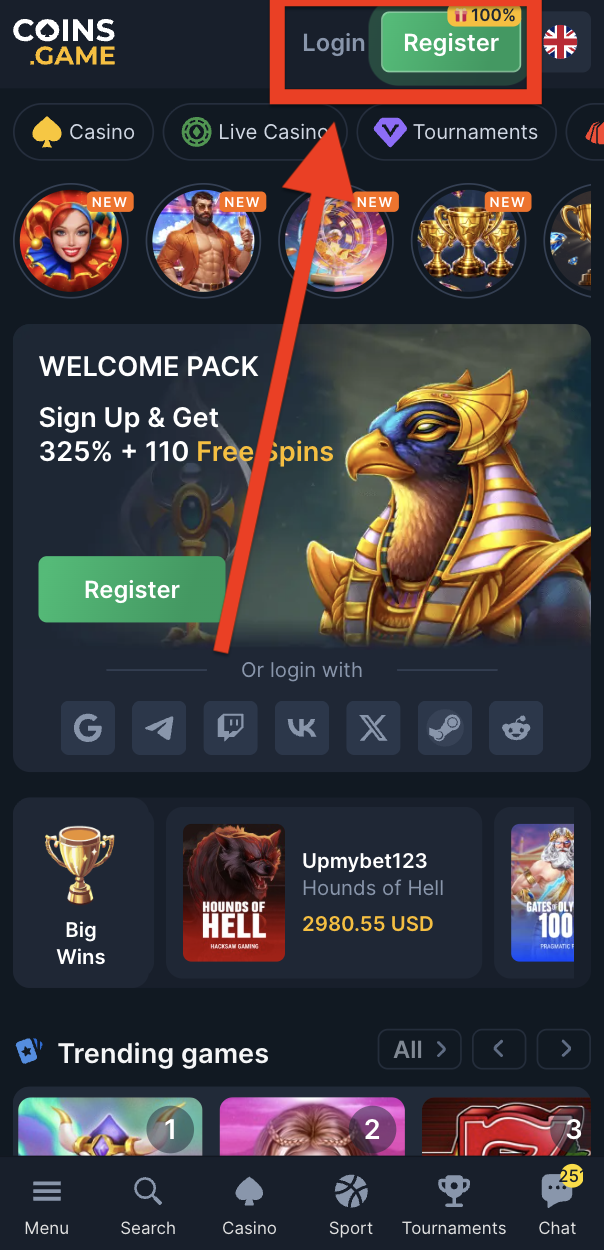
- Go to the Coins.Game site – once the page loads, a green "Registration" button appears in the top right corner. Next to the button, a label shows the current value of the welcome offer. Clicking it opens the account creation form.
- Fill in your account details – in the "Create your account" window, enter your email address and set a password. These details will later be used to log in, so the address must be active – the verification message will be sent to it.
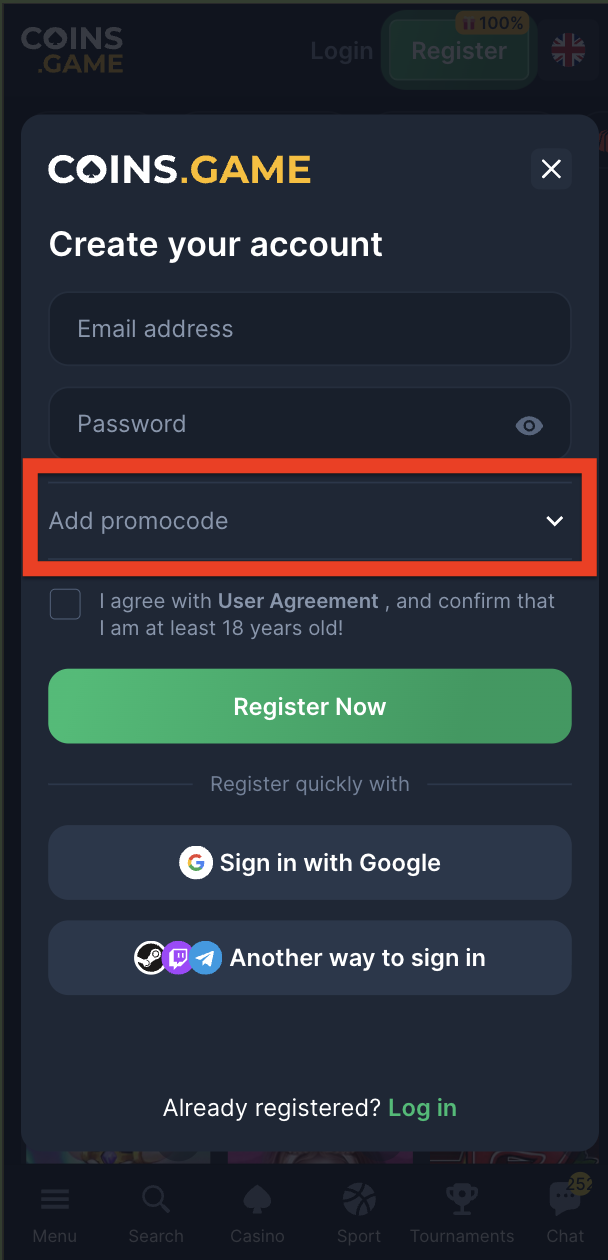
- Expand the code field – below the password field there is an "Add promo code" tab. By default it is collapsed; clicking the arrow on the right reveals the text field.
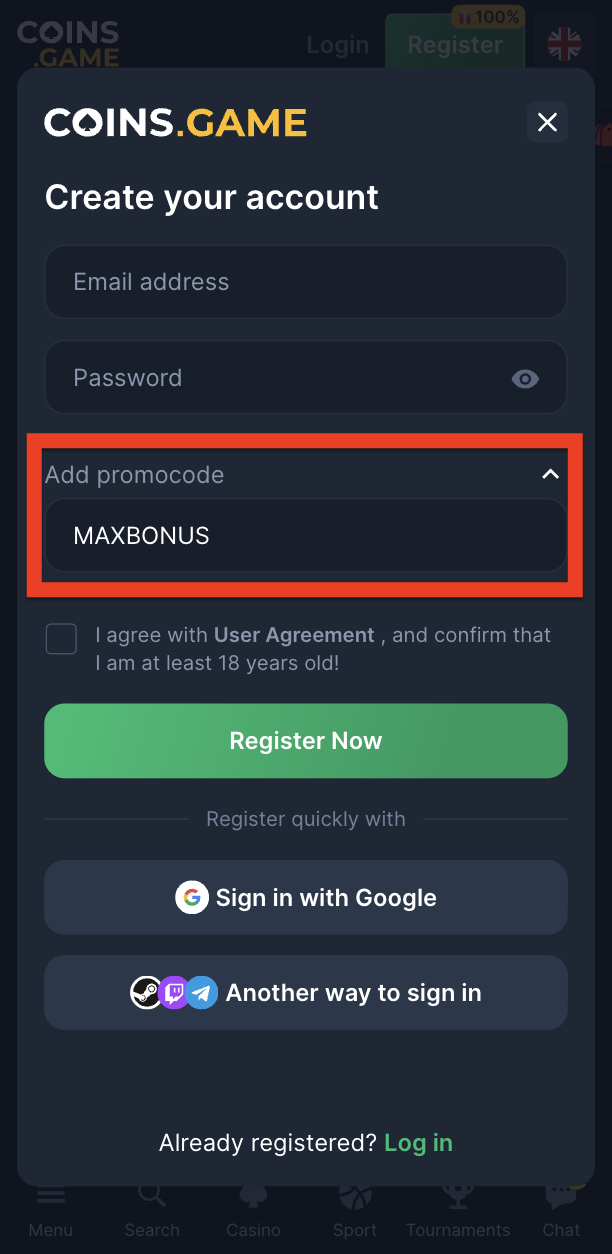
- Enter the code – in the revealed field, enter the code, for example MAXBONUS. It is not case-sensitive, but the code must be entered without spaces or extra characters. This is the only moment when a registration code can be linked to the account – once registration is complete, the field will no longer be available.
- Accept the terms – before submitting the form, you must tick the box confirming agreement with the User Terms and that you are at least 18 years old.
- Complete registration – clicking the "Register now" button creates the account. All that remains is to confirm your email address and phone number in the profile settings – the code bonus is credited right after verification.
The platform also allows quick registration via Google, Telegram, Twitch or Steam. If you choose this path, remember to first expand the "Add promo code" field and enter the code – social login skips the standard form, and a registration code cannot be added after the account is created.
Register with the MAXBONUS code
Types of Codes and Where to Activate Them
Not every Coins Game promo code works in the same place, so before activating it is worth checking which group a given offer belongs to. Registration codes – such as MAXBONUS – are entered only in the account creation form, as described above. Deposit codes are activated in the cashier while making a payment: the code field appears next to the payment method selection, and the bonus is credited together with the funds. Seasonal and tournament codes are entered in the promotions section of the logged-in user panel – that is also where the list of all offers available for the account is shown.
Each code has exactly one activation point and will not work elsewhere. Trying to enter a deposit code in the registration form will end with an error message, but this does not block the later, correct use of the same code in the cashier. The description of each offer published on the homepage states where a given string should be entered.
Activating a Code on Your Phone
Coins.Game works in a mobile browser with no need to download an app, and the layout of the registration form on a phone is identical to the desktop version. The "Registration" button is at the top of the screen, while the "Add promo code" tab is below the email and password fields, also in collapsible form. All the steps described above run the same way on mobile devices, including account verification and claiming the bonus. Free spins launched on a phone and on a computer use the same balance, so you can continue playing on another device at any time.
Account Verification and Bonus Withdrawal
Activating a code and playing with the bonus do not require full identity verification – a confirmed email address and phone number are enough. However, the KYC procedure becomes necessary before the first withdrawal of funds. It involves submitting an identity document and, in some cases, proof of address. Documents can be uploaded in the profile settings, and their review usually takes from a few minutes to 24 hours.
Completing verification earlier shortens the wait for withdrawing bonus winnings, so it is a good idea to submit documents right after registration, even before meeting the wagering requirement. The personal data provided in the profile must match the documents – discrepancies are the most common reason for the procedure being extended.
What Happens After Activation
The credited bonus is visible in the promotions section of the account panel. For free spins, simply open the indicated slot – the spins start automatically, and winnings go to the bonus balance. These funds are subject to the wagering requirement set out in the terms of the given offer; once it is met, they can be withdrawn or used in any games. Wagering progress is tracked in real time in the bonus tab, so at any moment you know how much is left until the funds are fully unlocked.
Keep the time frames in mind: both using the spins and wagering the winnings have a set deadline. Once it passes, the unused part of the bonus expires and cannot be restored.
Common Problems with Codes
The code was not accepted during registration. The most common cause is a typo or copying the code together with a space. Clear the field and enter the code manually.
The code field is not visible. The "Add promo code" tab stays collapsed by default – just click its header or arrow to reveal the text field.
The bonus did not appear in the account. Registration offers require confirming the email address and phone number. If the bonus is still not visible after full verification, the 24/7 CoinsGame support chat resolves such cases within a few minutes.
The code has expired or has already been used. Every code has a set validity period and a limit of one activation per player, IP address and device. The validity of codes published on the homepage is checked on an ongoing basis, so before registering it is worth checking the latest list there.
Rules Worth Remembering
One account can use one active bonus offer at a time – the next code can be used after the previous promotion is settled. Creating multiple accounts to reuse registration codes is a breach of the terms and leads to bonuses being cancelled along with the winnings. The full terms of each offer, including the wagering requirement and withdrawal limit, are available in the promotion terms on the Coins.Game platform and in the descriptions of individual codes on the homepage.